Order Form and Customer Tracker System
Running a small business, freelance operation, or side hustle often feels like a juggling act where dropping one ball means losing revenue or trust. While digital tools are powerful, they can sometimes create friction through login fatigue, subscription costs, or complex interfaces that slow down simple transactions. This is where a dedicated Order Form, Order and Customer Tracker system bridges the gap between chaotic notes and expensive enterprise software. Whether you are printing these for your own daily operations or preparing a low-content book for KDP publication, having a structured, physical method to capture and track data remains one of the most reliable ways to maintain business continuity.
The core value of this specific tracker set lies in its tactile immediacy and structural discipline. Unlike a blank notebook that requires you to draw lines and remember what data points matter, a pre-formatted Order Form, Order and Customer Tracker provides instant cognitive scaffolding. It prompts you to capture essential details—client contact info, SKU numbers, payment status, and delivery dates—without relying on memory. For entrepreneurs aged 20 to 50 who navigate both digital and analog worlds, this hybrid approach offers a tangible backup system that doesn't require Wi-Fi or battery life to function effectively during market stalls, client meetings, or creative sessions.
Essential Components and Structural Integrity
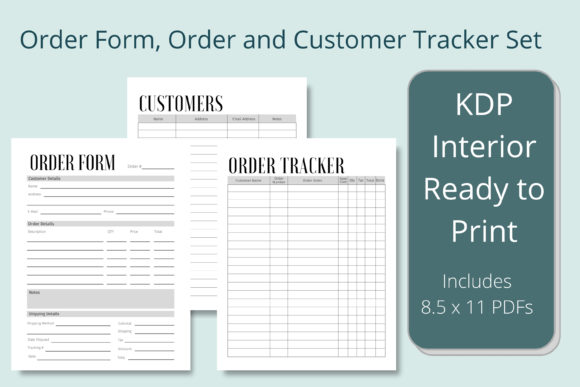
A high-quality tracking system is defined by how well it balances information density with whitespace. The included files are formatted at 8.5 x 11 inches with no bleed, which is a critical technical specification for Amazon KDP upload. No-bleed formatting ensures that when you print or publish, none of your writing areas or table borders get trimmed off during the binding process. This standard size also fits perfectly into standard letter binders or clipboards, making it compatible with existing office supplies rather than requiring proprietary accessories.
The Order Form component serves as the point-of-sale interface. It needs clear sections for item descriptions, quantities, unit prices, taxes, and totals. A well-designed form reduces calculation errors and presents a professional face to customers, even if you are operating from a home studio. The Order Tracker acts as your production dashboard, allowing you to see the status of multiple jobs at a glance without flipping through individual invoices. Finally, the Customer Tracker functions as a lightweight CRM, helping you identify repeat buyers, track preferences, and manage communication history. Together, these three elements create a closed-loop system for managing commerce.
Practical Applications Across Diverse Industries
Versatility is the hallmark of effective business stationery. Creators selling at craft fairs benefit immensely from the Order Form, Order and Customer Tracker because it allows for offline sales processing when card readers fail or internet connectivity drops. For bakers and caterers, the order tracker prevents double-booking dates and ensures dietary restrictions noted on the customer tracker are never overlooked during fulfillment. Freelance designers and marketers use these logs to separate billable project hours from administrative tasks, providing clearer invoicing records at tax time.
Educators and program coordinators also find unique utility in these trackers. Managing supply orders for a classroom or tracking participant registrations for a workshop requires the same organizational logic as retail sales. By using a standardized form, volunteers and staff members can step in to help without needing extensive training on complex software. The physical nature of the tracker makes it accessible to team members who may not have digital access or prefer pen-and-paper workflows, ensuring inclusivity and operational resilience in educational settings.
Customization and Branding Opportunities
While the ready-to-upload PDF files provide immediate utility, the inclusion of an editable Canva link transforms this product from a static tool into a dynamic brand asset. Personalization is not just about aesthetics; it is about functional alignment with your specific workflow. A jewelry maker might need columns for metal type and stone carat weight, while a graphic designer might need fields for file formats and revision counts. Using the Canva template, you can adjust headers, add logo placement, or modify column widths to match your exact operational needs.
For those publishing low-content books on KDP, customization is equally vital for market differentiation. Adding niche-specific terminology or creating themed covers can make your Order Form, Order and Customer Tracker stand out in a saturated marketplace. You might create a version specifically for pet groomers, real estate agents, or personal trainers. The ability to edit the source file means you can rapidly prototype variations and test different niches without redesigning the layout from scratch. This flexibility extends to personal use as well, allowing you to create a cohesive visual identity across all your business documentation.
Evaluating Quality for Print and Digital Use
When selecting or preparing a tracker for professional use, line weight and contrast are paramount. Lines that are too dark can overwhelm handwriting, while lines that are too light may disappear during photocopying or scanning. The ideal Order Form, Order and Customer Tracker uses subtle gray guidelines that recede visually when text is added but remain visible enough to guide neatness. Paper quality considerations also matter; if you are printing at home, ensure the design accounts for standard printer margins so tables don't get cut off. For KDP users, verifying the interior file against Amazon’s previewer before publishing prevents costly proofing errors regarding safe zones and gutter margins.
Usability testing is another crucial step. Before committing to a full print run or bulk purchase, print a single copy and use it for a week. Do the boxes provide enough space for your typical handwriting size? Is there adequate room for notes or special instructions? Does the flow of information match your natural work process? Sometimes a form looks perfect on screen but fails in practice because the "Total" box is too small or the date field is in an awkward position. Real-world validation ensures the tool actually enhances productivity rather than becoming another administrative burden.
Enhancing Productivity Through Analog Systems
In an era of notification overload, the deliberate slowness of writing by hand can actually improve accuracy and retention. When you physically write down an order in your Order Form, Order and Customer Tracker, you engage motor memory that reinforces the details in your mind. This reduces the likelihood of transposition errors common when typing quickly. Furthermore, a physical tracker creates a boundary between work and rest; closing the binder signals the end of the workday in a way that closing a browser tab cannot. For professionals seeking to reduce screen time while maintaining rigorous organization, this analog solution supports both mental health and business efficiency.
Ultimately, the effectiveness of any tracking system depends on consistency. Choose a format that you will actually enjoy using. Whether you are utilizing the ready-made PDFs for immediate implementation or customizing the Canva templates to build a unique product line, the goal remains the same: creating a reliable repository of truth for your business transactions. By investing time in setting up a proper Order Form, Order and Customer Tracker, you are building infrastructure that scales with you, protecting your revenue and reputation one entry at a time.