Debt Tracker - KDP Interior: A Practical Guide to Quality and Customization
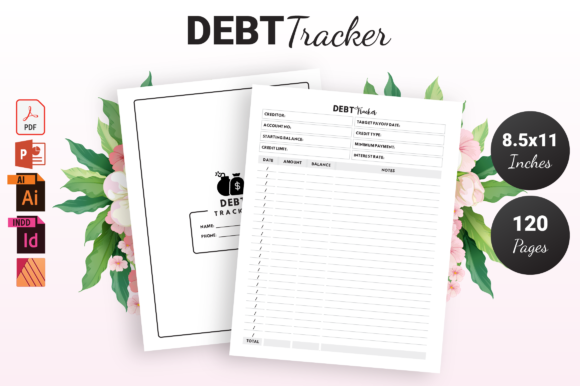
Achieving financial clarity often starts with a simple, consistent habit of tracking obligations. For self-publishers and digital product creators, the Debt Tracker - KDP Interior serves as both a functional tool for end-users and a foundational asset for building a low-content publishing portfolio. This resource is designed to streamline the creation process, offering a structured 120-page layout at the standard 8.5″ x 11″ dimension. However, possessing the file is only the first step. The difference between a professional-grade publication and an amateurish listing often lies in how the source files are managed, customized, and prepared for print.
Many creators rush to upload without fully leveraging the included PDF, PowerPoint, Illustrator, and InDesign formats. This oversight can lead to formatting errors, poor user experience, or missed branding opportunities. Understanding the technical specifications and common pitfalls associated with this interior template ensures that your final product meets the high standards expected by consumers seeking financial organization tools.
Understanding the File Ecosystem and Format Selection
One of the most frequent mistakes beginners make is relying solely on the print-ready PDF without exploring the editable source files. While the high-quality PDF is excellent for immediate use, it limits your ability to differentiate your product in a saturated market. The inclusion of PPTX, AI, and INDD files is intentional, yet many users overlook them due to software intimidation or time constraints.
Choosing the wrong format for your skill level can result in wasted hours or corrupted layouts. If you are unfamiliar with Adobe InDesign or Illustrator, attempting complex vector edits may lead to accidental misalignment of margins or bleed settings. Conversely, using PowerPoint for extensive layout changes can sometimes shift elements if slide master settings are not respected.
- For Quick Launches: Use the pre-formatted PDF if you intend to keep the design exactly as provided. Ensure you verify the file integrity before uploading.
- For Light Customization: Utilize the PPTX file to change fonts, colors, or add introductory pages. This format is accessible and sufficient for text-based modifications.
- For Professional Rebranding: Use the AI or INDD files to alter structural elements, adjust grid systems, or integrate unique illustrations. These formats preserve vector quality and precise typography.
By matching the file type to your actual editing needs, you maintain the structural integrity of the Debt Tracker - KDP Interior while avoiding unnecessary technical complications that could delay your launch.
Navigating No-Bleed Specifications Correctly
This specific interior template is configured with No Bleed. A significant number of KDP rejections and printing issues stem from misunderstanding what this means. Creators often assume they can extend background colors or border elements to the edge of the page after downloading the file. Because this template lacks bleed allowance, any content extending beyond the safe zone will be trimmed during production, potentially cutting off critical tracking tables or headers.
Another common error involves placing essential content too close to the gutter or outer edge. Even though the dimensions are 8.5″ x 11″, the printable area is smaller. Failing to respect the safety margins can make the debt tracker difficult to write in, especially when bound. Users need adequate white space to comfortably record balances, interest rates, and payment dates.
To avoid these presentation failures, always enable margin guides in your editing software before making adjustments. Verify that all interactive elements remain well within the safe zone. If you decide to add decorative borders later, ensure they stay inside the designated non-bleed boundaries. Respecting these physical constraints is not just about compliance; it is about ensuring the person using the tracker has a frustration-free experience managing their finances.
The Risks of Neglecting Page Count Consistency
The template contains exactly 120 pages. This count is calculated based on the current content density and paper thickness recommendations. A subtle but costly mistake occurs when creators delete or add pages without recalculating the spine width or checking pagination logic. Debt trackers rely heavily on sequential organization. Removing ten pages of expense logs might seem harmless, but it can disrupt cross-referencing sections or leave awkward blank spreads that confuse the buyer.
Furthermore, altering the page count affects the overall perceived value. A 120-page book feels substantial and worth the price point. Drastically reducing this volume without adding higher-value content elsewhere can negatively impact conversion rates. If you must modify the length, do so strategically. Replace low-value filler pages with useful financial reference charts, glossary terms, or motivational quotes rather than simply deleting space. Always export a fresh PDF and check the total page count against KDP’s calculator to ensure your cover template still aligns perfectly with the new interior block.
Customization Beyond Surface-Level Changes
While changing the title font is a good start, true value comes from functional customization. Many sellers download the Debt Tracker - KDP Interior and publish it with minimal alteration, resulting in duplicate content issues or lackluster reviews. Buyers can spot generic templates quickly. To stand out, focus on improving usability rather than just aesthetics.
Consider the specific audience segment you are targeting. A debt tracker for students differs functionally from one designed for small business owners or families consolidating loans. Using the editable INDD or AI files, you can tailor the column headers, add specialized categories like "tuition" or "inventory," or include amortization tables relevant to that niche. This level of adaptation transforms a generic template into a specialized solution.
Be cautious of over-designing. A common pitfall is adding heavy graphics or dark backgrounds that consume excessive ink or reduce writing legibility. Remember that this is a workbook intended for daily use. High-contrast, clean lines and ample writing space always outperform decorative complexity in this category. Test print a few pages at home to verify that the paper weight and ink coverage work harmoniously before committing to a full proof order.
Verifying Source File Integrity Before Publication
Before listing your product, conduct a thorough quality assurance check. Downloaded files can occasionally suffer from font substitution issues if your system lacks the original typefaces. Open the source files and scan for missing links or replaced fonts that alter the layout spacing. What looks perfect on screen may render differently in the final PDF export if fonts are not properly embedded or outlined.
Additionally, validate the hyperlinks if your digital version includes them. Although KDP print books are static, some creators offer companion digital downloads. Ensuring all navigation elements function correctly prevents customer support headaches later. Finally, review the metadata and description to accurately reflect the features. Misrepresenting the interior as having bleed when it does not, or claiming editable fields in a print book, leads to returns and negative feedback. Transparency regarding the 8.5″ x 11″ no-bleed format builds trust and sets correct expectations.
Treating the Debt Tracker - KDP Interior as a professional foundation rather than a quick shortcut elevates the quality of your publishing business. By respecting technical specifications, choosing appropriate file formats, and prioritizing user functionality over superficial changes, you create a resource that genuinely helps people regain financial control. This thoughtful approach not only protects your reputation but also contributes to sustainable sales through positive user experiences and organic visibility.