Project Planner L KDP Template: Streamlining Low-Content Book Creation
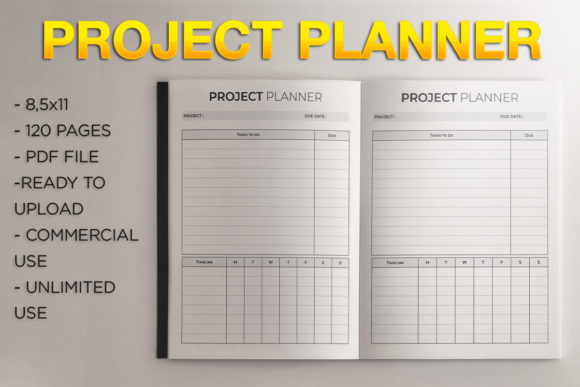
Creating a successful low-content book on Amazon Kindle Direct Publishing requires more than just a good idea; it demands precise technical execution and a layout that serves a specific functional purpose. The Project Planner L KDP Template is designed to bridge the gap between concept and publishable asset, providing a pre-formatted foundation for creators who want to launch productivity tools without spending weeks on interior design. This 8.5″ x 11″ no-bleed template eliminates the most common formatting errors associated with self-publishing planners, allowing publishers to focus on niche research, cover design, and marketing strategy rather than margin adjustments.
In the broader ecosystem of digital publishing, this template functions as a standardized production asset. It fits into the workflow after niche validation but before the final upload phase. For entrepreneurs, educators, and freelancers building a portfolio of planning journals, consistency is key to establishing brand recognition and ensuring customer satisfaction. By utilizing a fixed 120-page structure, creators can maintain uniformity across a series of books, making it easier to bundle products or create variations for different target audiences. The template serves as the reliable chassis upon which unique value propositions are built.
Technical Specifications and Workflow Integration
Understanding the technical parameters of the Project Planner L KDP Template is essential for seamless integration into your publishing workflow. The file is delivered as a single PDF formatted specifically for the 8.5″ x 11″ trim size with no bleed. This specification is critical because "no bleed" means all content must remain within the safe zone, typically leaving a margin of at least 0.375 inches on the outer edges and additional space for the gutter binding. Because this template has these margins pre-calculated, users avoid the rejection notices that frequently plague new KDP publishers attempting to format documents from scratch.
The 120-page count is strategically chosen for several practical reasons. First, it provides sufficient depth for a comprehensive project planner without driving printing costs so high that profit margins evaporate. Second, it aligns with standard spine width calculations, making cover design predictable. When integrating this template into your process, treat the PDF as a locked master file. Do not alter the page size or margins in your PDF editor. Instead, use the template as the base layer and add any custom branding, logos, or introductory text as separate overlay elements if your software allows, or simply accept the clean, minimalist utility it provides out of the box.
Compatibility with Design and Publishing Tools
This template interacts smoothly with standard publishing workflows. While it is ready for direct upload to KDP, many creators use it in conjunction with other tools to enhance value. For example, you might import the PDF into Canva, Affinity Publisher, or Adobe InDesign to add a custom title page, copyright notice, or resource list at the beginning of the book. When doing so, ensure your document settings match the template’s 8.5″ x 11″ dimensions exactly. If you are using this template as part of a larger business workflow, such as creating client onboarding kits or educational course companions, the standardized format ensures that the physical product feels professional and intentional.
For those managing multiple SKUs, organization is paramount. Maintain a clear file naming convention that references the template version, trim size, and bleed status. This prevents accidental uploads of incorrect files when scaling your catalog. Since the Project Planner L KDP Template is a static asset, version control is straightforward, but keeping track of which covers pair with which interiors remains a necessary administrative task.
Practical Applications Across Different Niches
The versatility of a project planner layout extends far beyond generic productivity. The structure provided by this template supports various specific use cases, each requiring a slightly different approach to positioning and metadata.
- Freelancer and Agency Management: Independent contractors often need physical spaces to track client deliverables, invoice schedules, and project milestones. This template serves as an analog complement to digital tools like Trello or Asana, offering a distraction-free zone for deep work planning.
- Educational Course Companions: Teachers and online course creators can use this planner as a workbook for students. The structured pages allow learners to map out study schedules, assignment deadlines, and learning objectives without the creator needing to design a custom interior from zero.
- Creative Project Tracking: Writers, artists, and makers benefit from linear planning structures to break down large creative endeavors into manageable tasks. The no-bleed design ensures that writing space is maximized and never lost in the binding, which is crucial for detailed note-taking.
- Small Business Operations: Entrepreneurs launching new products can use this planner to document the development lifecycle. Having a dedicated physical record helps in post-project reviews and process optimization, turning the planner into a historical archive of business decisions.
In each of these scenarios, the template acts as a scaffold. The user does not need to reinvent the wheel; they simply need to apply their specific context to the existing framework. This reduces the cognitive load associated with starting a new planning system and increases the likelihood of consistent usage.
Pre-Launch Preparation and Quality Control
Before uploading the Project Planner L KDP Template to Amazon, a rigorous quality control check is non-negotiable. Even though the template is pre-formatted, your specific handling of the file can introduce errors. Always download and review the KDP Previewer file generated during the upload process. Check specifically for content that may have shifted too close to the gutter or outer margins. Verify that the total page count matches your cover design specifications; a mismatch here will result in an immediate error.
Consider the user experience during this preparation phase. Open the PDF on multiple devices and print a test copy at actual size. Does the writing space feel adequate? Is the line spacing comfortable for handwriting? These tactile factors determine review ratings more than almost any other element in low-content publishing. If you plan to add custom content, ensure it respects the original safe zones. Adding a motivational quote is valuable, but not if it gets cut off during trimming. Respecting the technical constraints of the no-bleed design is what separates amateur publications from professional-grade tools.
Strategic Positioning and Long-Term Value
Using a pre-made template like this does not mean sacrificing uniqueness; it means optimizing efficiency to allow for greater strategic focus. When you save twenty hours of interior formatting, you gain twenty hours to research keywords, analyze competitor reviews, and craft compelling book descriptions. The template handles the commodity aspect of the book's interior, freeing you to build value through curation, branding, and audience targeting.
For long-term sustainability, consider how this template fits into a broader product ecosystem. A standalone planner is a single transaction; a planner that links to a digital download, a video tutorial, or a community group is a relationship. Use the first few pages of the template (if you choose to customize them) or the back matter to connect the physical book to your wider platform. This transforms a simple stationery item into a touchpoint for your brand.
Efficiency in creation should never come at the cost of relevance. Regularly audit your planner listings against current market needs. Just because the Project Planner L KDP Template is ready to use doesn't mean every iteration should be identical. Rotate covers, update titles based on seasonal trends, and test different subtitle keywords. The template is a constant variable in your testing equation, allowing you to isolate and measure the impact of your marketing and positioning efforts without the noise of inconsistent interior quality.
Optimizing the Upload Process
When you are ready to publish, the actual upload process for this template is streamlined due to its adherence to standard KDP specifications. Select the 8.5″ x 11″ trim size and explicitly choose "No Bleed" when prompted. Upload the PDF and wait for the automated review. Because this template is built to spec, approval times are typically faster than for custom-formatted files that trigger manual review flags.
After publication, monitor the "Look Inside" feature on Amazon to ensure the preview renders correctly. Sometimes, the conversion process can alter how fonts or lines appear. Catching these issues early allows for quick corrections. Remember that customer feedback regarding the interior layout is gold; if users consistently mention that the margins are perfect or the writing space is ideal, highlight this in your future marketing copy. Conversely, if there are recurring complaints, use them to inform how you utilize or modify the template in future editions.
Ultimately, the Project Planner L KDP Template is a tool for execution. It removes technical friction, enforces professional standards, and accelerates time-to-market. Whether you are a seasoned publisher scaling a catalog or a first-time creator testing a niche, this resource provides the structural integrity necessary for success. By treating the template as a foundational component of a larger business strategy, you ensure that your low-content books are not just filler, but functional assets that serve real needs and generate sustainable returns.