Mastering KDP Low Content Publishing with a No-Bleed Blog Post Planner Template
The landscape of self-publishing has evolved dramatically over the last decade, shifting from text-heavy novels to functional, utility-driven books that solve specific problems for niche audiences. Among the most popular and accessible entry points into this ecosystem is the low-content book market on Amazon Kindle Direct Publishing (KDP). Specifically, the Blog Post Planner KDP Template represents a perfect intersection of digital asset creation and physical product sales. For creators looking to monetize their design skills or provide value to content marketers, understanding the nuances of an 8.5″ x 11″ no-bleed planner is essential for success.
This article explores the fundamental concepts behind using pre-formatted PDF templates for KDP, why the "no bleed" specification matters, and how this specific tool fits into the broader workflow of modern content creation and passive income generation.
Understanding the Role of Functional Planners in Self-Publishing
To fully appreciate the value of a Blog Post Planner template, one must first understand the shift in consumer behavior regarding physical notebooks. Despite living in a digital-first era, writers, bloggers, and social media managers continue to seek analog tools for organizing complex digital workflows. A blog post planner is not merely a notebook; it is a structured system designed to guide a creator through ideation, keyword research, drafting, editing, and promotion.
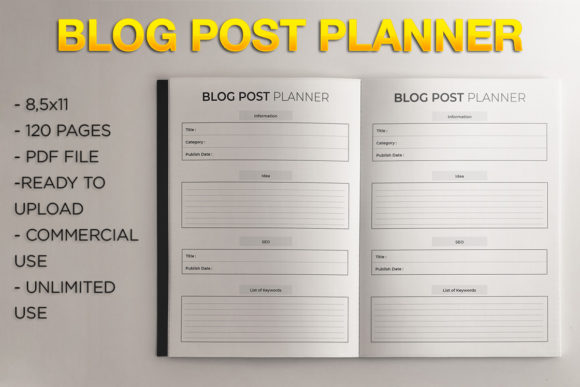
When you utilize a KDP low content template, you are essentially productizing this structure. Instead of writing 50,000 words of prose, you are designing a user interface on paper. The 120-page format mentioned in this specific template provides substantial utility without becoming unwieldy. It offers enough space for months of planning while keeping printing costs low enough to maintain a healthy royalty margin. This balance between utility and profitability is the cornerstone of successful low-content publishing.
The Significance of the 8.5″ x 11″ Trim Size
Size matters significantly in the usability of a planner. While A5 or 6x9 sizes are popular for journals, the 8.5″ x 11″ trim size is often superior for professional planning tools. Bloggers need room to create mind maps, write out long-tail keywords, sketch featured image concepts, and track analytics metrics side-by-side. The letter-size format mimics standard office paper, making it feel like a legitimate business tool rather than a personal diary.
From a production standpoint, 8.5″ x 11″ is also a native size for many home printers and digital devices. When customers look for printable versions or reference materials, this dimension aligns with their existing ecosystems. By choosing this size for your KDP template, you ensure compatibility with both the physical book market and the digital planning community.
Demystifying "No Bleed" Design for Beginners
One of the most common technical hurdles for new KDP publishers is understanding print specifications. The term "no bleed" frequently causes confusion, yet it is critical for ensuring your interior file is accepted by Amazon’s automated review systems.
In printing terminology, "bleed" refers to artwork or background colors that extend beyond the edge of the page, requiring the printer to trim the paper to achieve an edge-to-edge look. A no bleed design means all content, including borders, lines, and text, stays within a safe margin away from the trim line. Typically, this requires a minimum safety margin of 0.25 inches on the outside edges and additional gutter space near the spine.
Why Choose No Bleed for Planners?
- Simplicity: No bleed designs are more forgiving. You do not have to worry about slight shifts during the trimming process cutting off important writing spaces or headers.
- Cost Efficiency: In some cases, full-bleed color interiors can be more expensive or limited in distribution options. Standard black and white no-bleed interiors offer the widest global distribution and lowest printing costs.
- User Experience: For a blog planner, users need to write near the edges. If a design has full bleed graphics, the binding might make those areas unusable. A no-bleed layout ensures every square inch of the designated writing area is accessible.
When using a pre-made Blog Post Planner No Bleed Design, these margins are already calculated. This eliminates the guesswork and prevents the frustration of rejected manuscripts due to margin errors.
Practical Application: From Download to Published Book
The primary advantage of purchasing or downloading an instant PDF template is the drastic reduction in time-to-market. Creating a 120-page interior from scratch requires knowledge of typography, grid systems, and binding margins. A ready-made template bypasses this learning curve.
Step-by-Step Upload Process
- File Verification: Before uploading, open the PDF to ensure all pages are present and the dimensions read exactly 8.5″ x 11″ in your PDF viewer properties.
- KDP Setup: Create a new paperback project. Select English (or your target language) and enter your metadata.
- Print Options: This is the most critical step. Select Black & White Interior (unless the template is specifically color). Choose Trim Size: 8.5 x 11 in. Crucially, select No Bleed.
- Upload: Upload the single PDF file as your manuscript. Use the online previewer to check margins and flip through the virtual book.
- Pricing: Because this is a 120-page no-bleed book, your printing cost will be relatively low. Price your book competitively against other blogging planners while ensuring a royalty that makes the effort worthwhile.
Integrating Physical Planning into Digital Workflows
Critics often ask why anyone would buy a physical planner for a digital job. The answer lies in cognitive science and workflow optimization. Writing on paper engages different neural pathways than typing. For bloggers facing burnout or creative blocks, stepping away from the screen to plan content manually can restore creativity.
A well-designed Blog Post Planner KDP Template facilitates this transition. It acts as a bridge. Pages dedicated to SEO keyword clustering allow for non-linear thinking that spreadsheet software often stifles. Editorial calendar spreads provide a bird's-eye view of content strategy that gets lost in Trello boards or Asana lists. By selling this template, you are not just selling paper; you are selling a methodology for better content creation.
Expanding Beyond Amazon KDP
While KDP is the primary platform, the versatility of a no-bleed PDF extends further. Because the file is an instant download, savvy creators often repurpose the same asset. With minor modifications, this 8.5″ x 11″ planner can be sold as a digital printable on Etsy or Gumroad. Teachers, students, and corporate trainers may prefer a digital version they can annotate on an iPad. Understanding the dual nature of this asset—as both a physical KDP book and a digital productivity tool—maximizes the return on investment.
Common Misunderstandings About Low Content Templates
It is vital to address ethical and quality considerations when using templates. A common misconception is that using a template guarantees sales. It does not. The template is merely the foundation. Success comes from how you position the product.
Another misunderstanding involves exclusivity. Unless you purchase exclusive rights to a template, other sellers may use the same interior. To differentiate your Blog Post Planner, focus heavily on your cover design and marketing copy. Your cover should speak directly to a specific sub-niche of bloggers (e.g., "Food Blog Planner" or "Tech Reviewer’s Organizer") rather than a generic audience. The interior provides the function, but your branding provides the connection.
Furthermore, some beginners assume "no bleed" means "no design." On the contrary, no-bleed interiors can be beautifully designed with intricate borders, headers, and icons, provided they respect the safety margins. The constraint of no bleed encourages cleaner, more focused layouts that prioritize usability over decorative excess.
Building a Sustainable Publishing Portfolio
Using a Blog Post Planner No Bleed Design – 8.5″ x 11″ is an excellent educational exercise for aspiring publishers. It teaches the technical requirements of KDP, the importance of niche selection, and the value of solving real user problems. Whether you are a seasoned author diversifying your income streams or a complete beginner testing the waters of self-publishing, this type of template lowers the barrier to entry.
Ultimately, the goal is to create products that genuinely help people organize their lives and businesses. When you approach low-content publishing with a mindset of service rather than just profit, the quality of your output improves naturally. The 120-page format offers ample value, the 8.5″ x 11″ size ensures practicality, and the no-bleed specification guarantees a smooth publishing experience. By mastering these elements, you build a solid foundation for a sustainable and creative publishing business in the digital age.