Designing a Profitable Wedding Guest Book for KDP Interior: Specifications, Layouts, and Market Strategy
The low-content publishing market on Amazon has evolved significantly, moving beyond simple lined journals to highly specialized functional books. Among these niches, the wedding sector remains a perennial powerhouse due to its consistent demand and emotional purchasing drivers. For creators utilizing print-on-demand services, developing a high-quality Wedding Guest Book for KDP Interior requires more than just placing lines on a page; it demands an understanding of physical printing constraints, user experience during high-stress events, and current aesthetic trends. Success in this category hinges on technical precision and design empathy, ensuring the final product serves both the couple preserving memories and the guests signing their names.
Technical Precision in Trim Size and Bleed Configuration
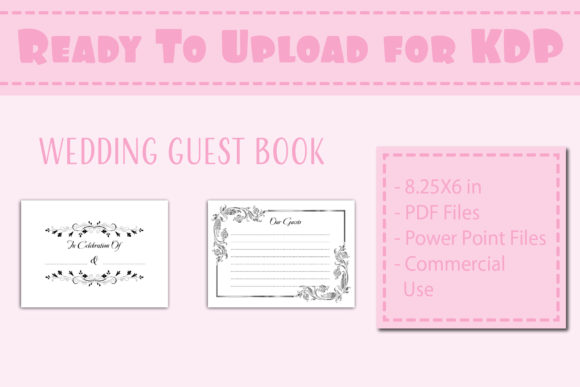
One of the most critical decisions in creating a viable interior file is adhering to strict dimensional standards. While standard trade paperbacks often utilize 6x9 inch dimensions, the wedding stationery market frequently favors landscape orientations that mimic traditional guest books and photo albums. The 8.25 x 6 inch trim size has emerged as a preferred format for this specific application. This landscape orientation provides ample horizontal space for columns, allowing guests to write comfortably without cramping their handwriting or running off the edge of the page.
When preparing files for this dimension, the inclusion of bleed is non-negotiable for professional results. A Wedding Guest Book for KDP Interior with bleed allows design elements, background patterns, or decorative borders to extend to the very edge of the paper after trimming. Without bleed, printers must leave a mandatory white safety margin, which can make a custom-designed book look like a generic office notebook. Creators must ensure their source files, whether generated in PowerPoint or exported as PDF, include an extra 0.125 inches on the top, bottom, and outside edges. For an 8.25 x 6 inch book with bleed, the actual document setup must be 8.375 x 6.125 inches. Failing to account for this shift is the primary reason for rejected uploads or poorly cropped interiors.
Optimizing Page Count and Paper Opacity
The standard specification of 100 pages strikes a strategic balance between utility and cost-efficiency. In the context of wedding planning, couples often estimate guest counts ranging from 50 to 150 attendees. A 100-page interior typically accommodates 400 to 800 signatures depending on the layout density, making it suitable for the vast majority of mid-sized weddings. Furthermore, keeping the page count at this level maintains a lower printing cost, allowing publishers to price the book competitively while retaining healthy royalty margins.
However, page count interacts directly with paper opacity. KDP standard color paper is 55# (90 GSM), which is relatively thin compared to premium stationery. When designing a black and white interior, creators must be mindful of ink coverage. Heavy solid black backgrounds or dense grayscale images can cause show-through, where content from one side of the page is visible on the reverse. To mitigate this in a Wedding Guest Book for KDP Interior, designers should utilize lighter line weights, avoid large solid fill areas, and consider leaving the back of each signing page blank or using a subtle pattern rather than duplicating the entry fields. This single-sided approach not only prevents bleed-through issues but also enhances the perceived quality of the book.
User Experience and Functional Layout Design
Aesthetics attract the buyer, but functionality dictates the review rating. Guests at weddings are often standing, holding a drink, or rushing through a receiving line. The interior layout must accommodate these environmental factors. Columns should be clearly defined with adequate spacing. A common failure in amateur designs is insufficient writing space. Lines should be spaced at least 0.35 inches apart to accommodate various handwriting sizes and styles.
Beyond basic name and message fields, modern couples often seek additional data points that reflect contemporary wedding trends. Successful interiors now frequently include prompts such as:
- Relationship to the Couple: Helps organize memories by social circles later.
- Advice for the Newlyweds: Encourages longer, more meaningful entries than simple congratulations.
- Song Requests: Integrates the guest book into the reception entertainment.
- Polaroid/Photo Space: Dedicated blank boxes for attaching instant photos, turning the book into a hybrid scrapbook.
- Date and Location Fields: Essential if the book is used across multiple events like rehearsal dinners or brunches.
Incorporating these elements transforms a simple logbook into a keepsake artifact. However, creators must test these layouts rigorously. Printing a proof copy is essential to verify that column widths are practical and that header text does not get lost in the gutter binding area. For an 8.25 x 6 inch book, maintaining a safe zone of at least 0.375 inches on the binding side is crucial to ensure readability.
Leveraging Editable Source Files for Customization
The provision of editable source files, specifically PowerPoint templates alongside ready-to-print PDFs, represents a significant value proposition in this niche. While many buyers seek a finished product, a growing segment of the market consists of DIY brides, wedding planners, and other POD sellers who wish to modify the base template. By offering a Wedding Guest Book for KDP Interior with an accompanying PPTX file, creators cater to users who need to adjust fonts to match wedding invitations, add monograms, or translate headers into different languages.
This flexibility extends the lifecycle of the product. A static PDF is a one-time use asset, whereas an editable template becomes a foundational tool for multiple projects. For educators and researchers studying self-publishing workflows, these files also serve as excellent case studies in modular design. When structuring the PowerPoint master slides, ensure that all repeating elements (headers, footers, decorative corners) are locked on the master slide layer, while text fields and entry lines remain editable on individual slides. This prevents accidental misalignment during customization and maintains the integrity of the bleed settings.
Navigating Black and White Interior Constraints
Color printing costs significantly erode profit margins in the low-content book space. Therefore, mastering black and white design is a prerequisite for commercial viability. The challenge lies in creating visual interest without color. Relying solely on standard black lines results in a sterile appearance that fails to compete with established brands.
Effective monochrome design utilizes texture, contrast, and negative space. Floral illustrations, geometric art deco patterns, and minimalist boho arches render beautifully in grayscale when designed with varying line weights. Halftone effects can simulate shading without using gray ink, which can sometimes print muddy on standard paper. Additionally, typography plays a massive role in B&W interiors. Pairing an elegant script font for headers with a clean sans-serif for functional labels creates hierarchy and sophistication. Since the interior is strictly black and white, the contrast ratio must be high enough to remain legible even if the printer calibration varies slightly between facilities.
Creators should also consider the psychological impact of B&W design in a wedding context. While color is vibrant, black and white conveys timelessness, formality, and classic elegance. Marketing the interior as "vintage-inspired" or "classic minimalist" aligns the technical limitation of B&W printing with a desirable aesthetic attribute, turning a constraint into a selling point.
Strategic Differentiation in a Saturated Market
With thousands of guest books available, differentiation requires looking beyond the interior pages themselves. Although the product listing may specify "Interior Only," successful publishers understand that the interior must be designed with cover coordination in mind. Even if you are selling the interior file separately or focusing solely on the manuscript, providing guidance or placeholder title pages that suggest coordinating cover styles adds immense value.
The inside cover title page mentioned in the specifications serves as the bridge between the exterior branding and the functional interior. This page should include fields for the couple’s names, wedding date, and venue, set in a design style that mirrors the rest of the book. It acts as a dedicated ownership marker and sets the tone before the first guest signs. For sellers creating their own covers to pair with this interior, ensuring the spine width calculation matches the 100-page count is vital. A mismatched spine destroys the professional appearance of the final physical product.
Furthermore, testing is an ongoing process rather than a pre-launch checkbox. Market preferences shift seasonally. Rustic themes may dominate autumn searches, while floral watercolors peak in spring. Maintaining a library of tested, modular interior components allows creators to quickly assemble new variations of the Wedding Guest Book for KDP Interior to meet seasonal demand. Analyzing customer reviews of competitor products often reveals gaps in functionality—such as lines being too faint or margins being too narrow—that can be immediately addressed in your next iteration.
File Preparation Best Practices for Seamless Upload
The final step in the creation workflow is ensuring technical compliance for automated printing systems. PDF files should be flattened to prevent font embedding errors or layer shifting. All fonts must be embedded or converted to outlines within the PDF export settings. Resolution should be maintained at 300 DPI minimum; anything lower risks pixelated text or jagged illustration edges, which are particularly noticeable in high-contrast black and white printing.
For those utilizing the PowerPoint source files, it is advisable to include a "Read Me" instruction sheet within the download. This document should outline how to check slide size settings, how to export to print-ready PDF with bleed marks, and tips for selecting commercially licensed fonts if they choose to swap out the defaults. Educating the end-user reduces support requests and ensures the integrity of the design is maintained even when modified. This attention to post-purchase experience builds authority and trust, distinguishing professional resource creators from casual uploaders in the competitive KDP ecosystem.