Grocery List KDP Template: No Bleed Design Guide
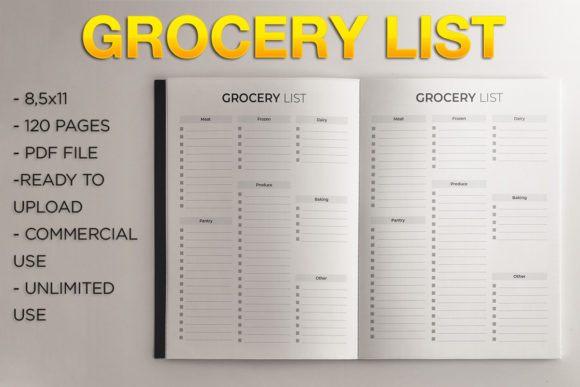
Creating a successful low-content book on Amazon Kindle Direct Publishing often comes down to the quality of your interior and the efficiency of your workflow. The Grocery List KDP Template offers a streamlined solution for publishers looking to enter the practical planner niche without spending hours formatting margins. This specific 8.5″ x 11″ no-bleed design provides a clean, professional foundation that meets KDP’s strict printing guidelines while offering ample space for functional customization. For creators, marketers, and small business owners, this template represents more than just a pre-formatted PDF; it is a scalable asset that bridges the gap between digital product creation and physical publishing.
Understanding the No-Bleed Advantage
The decision to utilize a no-bleed format is strategic for grocery list journals. In KDP terminology, "no bleed" means that all text, lines, and graphics remain within the safe margin area, ensuring nothing is trimmed off during the printing process. This 8.5″ x 11″ template maximizes usability by keeping content centered and legible. For the end-user, this translates to a frustration-free writing experience where checkboxes and lines are never lost in the binding gutter or cut off at the edge.
From a production standpoint, no-bleed interiors significantly reduce rejection risks during the KDP review process. Margins are pre-calculated to accommodate the 120-page count, which creates a substantial yet lightweight volume perfect for kitchen use. Because the design stays within safe zones, you avoid the common pitfalls of misaligned trim lines that plague many first-time self-publishers. This technical reliability allows you to focus your creative energy on cover design and keyword research rather than troubleshooting interior formatting errors.
Creative Adaptations for Niche Audiences
While the base Grocery List KDP Template is functional as-is, its true value emerges when adapted for specific sub-niches. A generic grocery list competes in a saturated market, but a specialized list solves a distinct problem. Consider how different demographics approach shopping and meal planning:
- Meal Prep Enthusiasts: Use the template as a base but add a header section for "Weekly Menu" or "Prep Day." The 8.5″ x 11″ size offers enough vertical space to separate ingredients by meal type rather than just store aisle.
- Budget-Conscious Shoppers: Incorporate a dedicated column for estimated costs versus actual prices. The wide margins inherent in no-bleed designs provide natural white space where users can track spending without feeling cluttered.
- Dietary Restriction Planners: Create variations focused on Keto, Vegan, or Gluten-Free shopping. You might add small icon guides or category headers specific to these diets, turning a simple list into a compliance tool.
- Families and Caregivers: Add sections for "Household Supplies" or "Pharmacy" alongside food items. Parents often need to consolidate multiple errands into one trip, making a multi-category layout highly valuable.
These adaptations do not require redesigning the entire interior. Often, simply changing the title page, adding a brief instruction sheet, or modifying the cover art to reflect the specific audience is enough to create a unique product listing from the same core template.
Strategic Applications Beyond Personal Use
This template serves audiences far beyond individual consumers. Entrepreneurs and educators can leverage the Grocery List KDP Template as a resource for broader projects. Real estate agents, for example, frequently provide welcome baskets to new homeowners. Including a branded, high-quality grocery journal adds a thoughtful, practical touch that standard closing gifts lack. Similarly, nutritionists and wellness coaches can use these journals as client handouts, providing a tangible tool for tracking dietary habits between sessions.
For bloggers and influencers in the home organization space, this template can serve as a lead magnet or a low-ticket digital-to-physical bridge. Instead of offering a flimsy printable PDF that users must print at home, you offer a professionally bound book via Amazon. This elevates your brand authority and provides a better user experience. The 120-page count ensures the book lasts for several months, keeping your brand top-of-mind long after the initial purchase.
Maintaining Quality and Consistency
When working with pre-made templates, maintaining originality is essential for long-term success on KDP. While the interior structure is provided, your responsibility lies in differentiation. Avoid using stock covers that come bundled with templates, as this leads to duplicate content flags. Instead, treat the Grocery List KDP Template as a canvas. Your cover design should communicate the specific angle of your book, whether that is minimalist aesthetics, vintage charm, or bold typography.
Consistency in branding also matters. If you plan to release a series of household organizers, ensure this grocery list shares visual DNA with future titles like cleaning logs or pantry inventories. This encourages cross-selling and builds a recognizable series. Always preview your final PDF upload using KDP’s previewer tool to verify that the no-bleed margins render correctly across all 120 pages. Even with a pre-formatted file, checking the digital proof prevents costly paperback corrections later.
Practical Workflow for Immediate Upload
The efficiency of this template lies in its readiness. To utilize it effectively, follow a disciplined upload workflow that respects the technical specifications:
- Verify File Integrity: Ensure the downloaded PDF has not been altered in a way that shifts margins. Open the file in a PDF viewer to confirm page dimensions are exactly 8.5″ x 11″.
- Select Correct KDP Settings: During setup, choose "Black & White Interior with White Paper." Select the trim size 8.5″ x 11″ explicitly. Crucially, select No Bleed when prompted. Choosing "Bleed" with this file will cause automatic rejection due to margin violations.
- Optimize Metadata: When listing, use descriptive backend keywords that match your niche adaptation. Terms like "meal prep organizer," "budget tracker," or "kitchen inventory log" perform better than generic "grocery list" tags.
- Category Selection: Place the book in relevant categories such as Home Improvement, Cooking Methods, or Budgeting. Accurate categorization helps the right readers find your specific variation of the template.
By adhering to these steps, you transform a simple digital asset into a compliant, market-ready product. The goal is to minimize technical friction so you can maximize creative output.
Balancing Utility with Aesthetic Appeal
A grocery list must be functional above all else, but aesthetic appeal drives the initial sale. The no-bleed constraint actually aids design clarity. Without elements bleeding off the page, the layout naturally breathes. Use this whitespace to your advantage. Clean lines and generous spacing make the list easier to read in busy environments like supermarket aisles. Avoid over-decorating the interior pages; heavy graphics increase ink costs and can distract from the primary purpose of writing.
Instead, let the cover carry the visual weight. A well-designed cover promises organization and peace of mind. Inside, the 120 pages should feel inviting, not intimidating. The repetition of a clean, structured page creates a meditative rhythm that users appreciate. This balance of external beauty and internal utility is what separates best-selling low-content books from forgotten uploads. By respecting the constraints of the Grocery List KDP Template while injecting your unique perspective, you create a product that genuinely serves the daily lives of your audience.